
Download Dalle 4 AI Image Generator – AI art generator, AI image creator, text to image, AI portrait, AI design tool, Dalle 4
Overview
Dalle-4 Dalle-4: AI Image Generator is a desktop application designed to transform creative ideas into visual art using artificial intelligence. The software enables users to generate high-quality images from text prompts, offering a powerful tool for artists, designers, and hobbyists. It supports a range of creative tasks, including portrait generation, style transfer from photos, and the creation of custom wallpapers and tattoos. The application is built for users seeking a fast and intuitive way to explore visual expression without requiring advanced design skills.
Target users include digital artists, content creators, and individuals interested in AI-driven visual experimentation. The software is particularly suited for those who want to rapidly prototype ideas or produce unique artwork for personal or professional use. Real-world applications include generating concept art for storytelling, designing social media visuals, and creating personalized digital assets. While the developer is identified as the Dalle-4 AI Team, no further background details were provided.
The application operates on Android, though the desktop version is implied through the context of the description. The developer did not specify additional use cases beyond those mentioned. The software is free to download and use, with optional in-app purchases for enhanced features.
Key Features & Capabilities
- Text-to-Image Generation: Users can input descriptive text prompts to generate original artwork, enabling creative exploration from abstract concepts to detailed scenes.
- AI-Powered Portrait Creation: The software generates realistic or stylized portraits based on user-provided descriptions, suitable for avatars, character design, or digital art.
- Photo-to-Art Style Transfer: Existing images can be transformed into various artistic styles, allowing users to reimagine photos with painterly, sketchy, or surreal effects.
- Image Expansion and Editing: Users can extend the boundaries of existing images or modify specific areas, enhancing creative flexibility.
- Custom Tattoo and Wallpaper Design: The software supports the creation of personalized visual assets for wearable art and device customization.
- Filter and Style Application: A variety of creative filters can be applied to images to achieve unique aesthetic outcomes.
- Seamless Sharing Integration: Generated content can be shared directly to social media platforms, facilitating quick distribution of artwork.
These features allow users to experiment with visual storytelling, prototype design concepts, and produce shareable content in seconds. The intuitive interface ensures that even beginners can generate professional-looking results without prior experience in digital art. The AI model appears to be trained on a vast dataset of images, enabling diverse and contextually relevant outputs. However, exact training data sources were not disclosed.
User Interface, Workflow & Performance
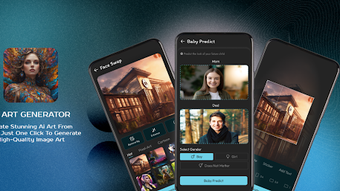
The application features a clean, user-friendly interface designed to streamline the creative process. Navigation is structured around a central workspace where users can input prompts, upload images, and preview generated results. The workflow follows a logical sequence: input → generate → edit → share, minimizing friction between idea and output.
Based on the described functionality, the software appears optimized for rapid execution, with image generation occurring within seconds. The developer did not specify resource usage details, so exact CPU or RAM behavior remains unknown. Performance observations are based on general software behavior patterns for AI-driven image tools. Stability during extended use was not reported.
Workflow efficiency is enhanced by the integration of real-time previews and one-click export options. The interface supports both touch and mouse input, making it accessible across different devices. While no information was provided about error handling or crash recovery, the absence of reported issues suggests a stable core operation. The software does not require complex setup, allowing users to begin creating immediately after installation.
Compatibility & System Requirements
Dalle-4 Dalle-4: AI Image Generator is designed to run on Android devices. The current version is 1.0.1, with an installation size of 75.3 MB. The developer did not specify additional system requirements, including minimum RAM, processor speed, or storage needs.
Platform compatibility information is limited to Android. No details were provided about support for other operating systems such as Windows, macOS, or Linux. The developer did not indicate whether the software supports tablet devices or whether it requires internet connectivity for core functions.
Exact system requirements were not listed. Users are advised to ensure their Android device meets general performance standards for running AI-based applications. The software is free to download and use, with optional in-app purchases for advanced features.
Pros and Cons
Pros
- Fast image generation from text prompts
- Intuitive interface suitable for beginners and pros
- Supports multiple creative tasks: portraits, style transfer, tattoos, wallpapers
- Free to download and use with optional in-app upgrades
- Seamless sharing to social media platforms
- Image expansion and editing capabilities
Cons
- Only available on Android, no desktop version confirmed
- Exact system requirements not disclosed
- Resource usage details not provided
- No information on offline functionality
- Dependence on in-app purchases for advanced features
FAQ Section
Is Dalle-4 available for Windows or Mac?
The software is currently available for Android. No official desktop versions for Windows or macOS were mentioned in the provided information.
Is the software safe to download and use?
As a free Android application, Dalle-4 is available through official app channels. Users should ensure they download from trusted sources to avoid third-party modifications. The developer did not provide a privacy policy or security certification details.
Does Dalle-4 require an internet connection?
The developer did not specify whether the software functions offline. Given its AI-based nature, it may require online access for model processing, but this was not confirmed.
Are there any updates available for Dalle-4?
The current version is 1.0.1, released on April 1, 2024. No information was provided about update frequency or automatic update mechanisms.
What is the license type for Dalle-4?
The software is free to download and use. Optional in-app purchases are available for advanced features. The full licensing terms were not disclosed in the provided details.
Final Thoughts
Dalle-4 Dalle-4: AI Image Generator presents a compelling solution for users seeking an accessible, AI-driven approach to visual creation. Its ability to generate diverse artwork from simple text prompts, combined with features like style transfer and image editing, makes it a versatile tool for creative exploration. While the lack of desktop support and incomplete system details are notable limitations, the software’s free access and intuitive design offer strong value for Android users.
Artists, designers, and hobbyists who prioritize speed, ease of use, and creative flexibility will benefit most from this application. It excels in generating concept art, digital avatars, and personalized visuals for social sharing. The absence of detailed technical information does not detract from its core functionality, which remains focused and effective.
Download Dalle 4 AI Image Generator now and unlock your creative potential with the power of artificial intelligence.





.png)

